THE HOME DEPOT
Design an Interactive Landscaping Planner Prototype
Overview
We were asked to explore and prototype a digital tool for the landscaping division of America’s largest home improvement retailer. The goal: increase revenue for the Landscaping Pod while providing added value to customers by simplifying complex outdoor projects.
Goals
-
Help customers confidently plan and manage landscaping projects
-
Drive increased engagement and sales for landscaping services and products
-
Create a visual, hands-on prototype that showcases the full landscaping experience
-
Present a compelling concept to the client for future development
Collaborators
-
UX Designers
-
Project Managers
-
Stakeholders across Marketing and Product
My Role
-
As the sole visual designer, I worked cross-functionally with UX teammates to:
-
Shape the UX strategy during a collaborative design sprint
-
Refresh the brand’s visual language
-
Design engaging UI and microinteractions
-
Build a high-fidelity prototype for testing and presentation
Timeline
-
2-week internal sprint
-
Prototype and user testing delivered by end of week 2
-
Present to stakeholders and receive feedback and iterate for another sprint

The Challenge
Business Need
-
Showcase a compelling landscaping planning tool to pitch to a major retail client
-
Increase revenue opportunities in the Landscaping Pod by offering customers digital project support
User Need
-
Homeowners feel overwhelmed by landscaping projects—uncertain about where to start, what’s required, and how to break a large project into smaller steps
-
They need a guided, digestible experience tailored to their expertise, budget, and project scope
Problem to Solve
How might we make landscaping projects feel more approachable, manageable, and personalized while driving engagement and sales for our client?
Research & Discovery
During our internal design sprint, we explored:
-
"How Might We?" questions to frame opportunities
-
Affinity mapping to identify pain points and themes
-
Crazy Eights & Solution Sketches to rapidly generate and share ideas
-
Competitive analysis of digital landscaping tools and project planners
Ideation
-
We landed on a concept that:
-
Breaks down complex landscaping projects into clear, manageable phases
-
Provides visual and instructional content at each step
-
Tailors the experience based on user input: skill level, location, season, and budget
User Testing
-
We built a high-fidelity prototype in Proto.io and tested it with users.
Results: -
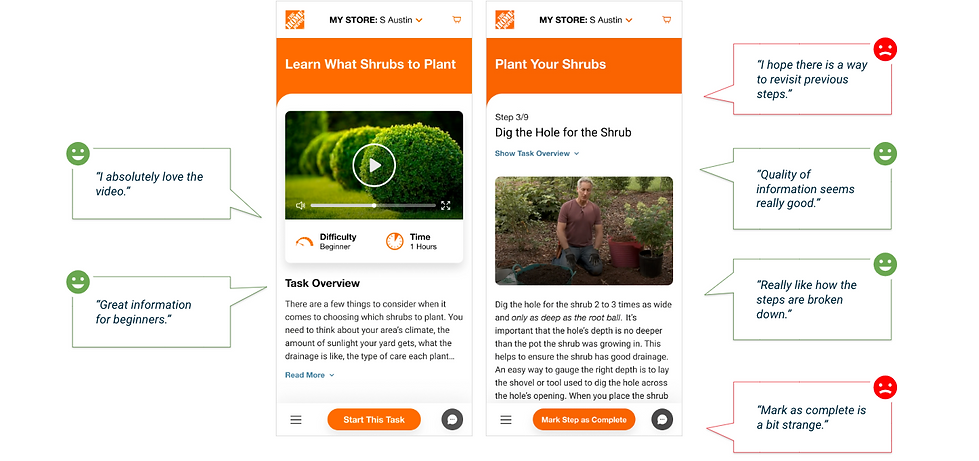
100% of testers said the tool would make landscaping projects easier for them
-
Users appreciated the step-by-step clarity, ability to self-select preferences, and visual interactivity
-
Feedback included suggestions for more tooltips, clearer icons, and more inspiration imagery
My Contributions
Visual Design & Branding
-
Refreshed the brand’s visual identity with subtle shadows, rounded corners, and a modern, friendly feel
-
Developed a clean, approachable UI system for both desktop and mobile views
UI Enhancements
-
Added animations using Adobe After Effects and Lottie, including:
-
Confetti pops for task completion
-
Loading animations for project steps
-
-
Designed visual elements like image callouts, videos, and progress indicators to make the experience feel dynamic and motivating
Prototyping
-
Built an interactive prototype in Proto.io for testing and presentation
-
Iterated with the UX team to refine based on user feedback
Final Design Highlights
-
A personalized project planner that:
-
Breaks large projects into phases
-
Provides timelines, tools, and detailed tasks
-
Tailors suggestions by season, location, experience, and budget
-
-
Designed to feel empowering, not overwhelming